Get in Touch

Saturday, 28 February 2015

Kids Friendly YouTube

YouTube has a massive audience of children watching videos already, even if they’re not allowed to sign up for an account. The site contains videos which are not suitable for kids and there was no effective way to Manage Kid’s viewing habits.


Here is the latest update from Tech world, which is in way good news for parents. YouTube kids addresses those concern providing an app where content will be screened and deemed appropriate for children.

Meanwhile, Google-owned site has already approached video producers to create a suitable content and videos. Still the date and launch of the service is not decided nor its clear that how exactly it will work. One thing is certain that it would have separate app or a locked channel.

The app's security feature is on the parental control which is a random code that changes each time you click the lock icon; the app displays the code with the numbers spelled out, so it's clear YouTube Kids is aimed at those who haven't yet learned to read.

The control includes a built-in timer which after it runs out, any kids still watching a video will be out of luck, as all videos will stop playing until it resets the next day — or until a parent increases the time limit. The standard time is 30 minutes and it can be increased to maximum 120; once the timer has begun, kids can notice how long they have left via a slowly shortening progress bar along the top of the screen.
Kids should be mindful of the timer. It measures time the app is open — not just time spent viewing videos — and it runs down even if the app is running in the background.
Parents can also go for disable search, so viewing of the videos will be limited to just whatever is on the home screen.  Some kids who can't read search anyway.  Via voice : with the help of a tap of the microphone will allow kids say exactly what they're looking for, even though results may vary depending on how well they've learned to enunciate.
And yes, YouTube Kids does include ads. The ones I saw seemed kid-appropriate (basically ads for other kid-friendly YouTube channels), although the "skip ad" button that appears on pre-roll ads will probably be lost on preschoolers just by learning to read. Parents will have to remind kids to tap the button lest the ads cut into valuable viewing time.

Add on Update:
Other adding news is that Google is developing versions of search , Gmail just for kids.

Have something to add ? Share it in the comments.


Post By: Nisha Punjabi

Monday, 9 February 2015

Ubuntu phone finally on sale

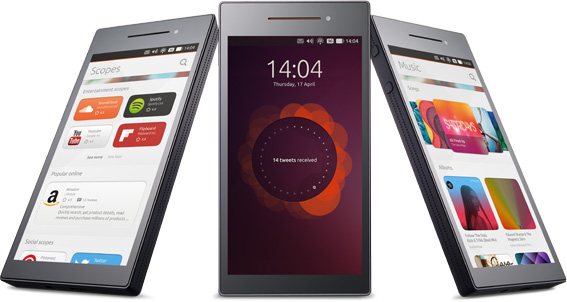
Most talked and awaited OS phone is being launched this week into the market.  Canonical is launching the first Ubuntu OS Smartphone. While Ubuntu was always a option in terms of Apple or Windows on desktop now this OS is also available on Smartphone.  


BQ Aquaris E4.5 is the model which would have Ubuntu OS and is on sale next week. It would cost roughly $190. Canonical is a Spanish manufacturer that took up challenge to provide Ubuntu OS with many new features. Like App store on IOS and Google play on Android Ubuntu is not having any kind of app store it has something unique such as themed panels called “scopes”.  User can swipe in between scopes for music, videos, news, contacts and many more.  Ubuntu OS is being coded with the latest technology known as HTML 5 , used to create modern website.  

Hardware specs?

This model has 4.5 inch display with 540 X 960 resolution.  It has 1.3GHz quad-core MediaTak chip and has 8 GB of storage and with 1 GB of RAM can give you super performance for the apps. It has 5 MP camera and dual sim slots, it has only one issue that it would not support 4G and LTE network, so if user is focusing on 4G and LTE experience from Ubuntu as of now it’s not possible.    

User Interface?

Once user opens any app, to get app menu user can slide from bottom of the app to get that app menu. For notifications and indicators it is same like IOS, Windows and Android, user needs to slide from top to get those links.
Where this phone is available?

Currently as per the sources this phone would be available for sale only in Europe. For US launch there are no plans yet. This phone would appear in “flash sales” going on for a limited time.  First flash sale would be announced on 10th February on Ubuntu’s Google+, Twitter and Facebook page.

What’s new in Ubuntu OS?


No Apps any more, here its scopes.  Scopes are on home screen which are dedicated to one topic like video, music or any news. For example, Instead of having YouTube app installed on your device and allot memory space to it, a separate video app is being saved on your phone that pulls video in one place.   Music scope is supporting sound-cloud and grove shark along with saved songs on your phone. Nearby scope helps you in getting info about weather and nearby places to explore.

Question is still there about maps and upcoming OS updates, no news on Bluetooth or any scopes by which files can be transferred to other OS devices.

Let’s wait to get the review of Ubuntu OS soon.


Stay updated, stay techo 

Saturday, 31 January 2015

How to make best use of IOS 8

It’s been 4 months that Apple launched IOS 8 and recently few days back latest update of IOS 8 was IOS 8.1.3 which has some minor fixes and little additional features for the users. You might be using IOS 8 but this below information would help you to make the most excellent use of IOS 8. So, how to make most of IOS 8

BE FAMALIAR WITH YOUR BATTERY

In IOS 8 user can see what percentage of battery is being used by which app. The amount of battery depends on which app you largely use it. Previously it was just showing percentage but now it shows accurate percentage along with the app. 


In my case Facebook and Whatsapp are on top as being addicted to social media. If you find any apps which is shown you can double tap on the home button and close the apps.

Where is it?

Settings è General è Usage è you would see option Button usage.  Tap on it so you would see list of apps under it. 

HANDS-FREE SIRI:
Hold down home button so that Apple’s built-in voice assistant, Siri would be at your service.

Where is it?

Settings è General è Siri è Tap to ON it. Now you can say “Hey Siri” and can ask your questions. So you can do is set your reminder or alarm or search anything on internet. If you are driving you can use this service to make a call.

What can you do more with SIRI?

CATCH THE PLAYED SONG

It has integrated with music-reorganization popular service such as Shazam. It can listen to the playing music and identify which song is being played. To find out the name of the current song played as Siri “What’s Playing”? Siri would listen to music for a while and it would give the name of the song in result along with artist and also a link from iTunes.

ARE YOU SHOPPOHOLIC?

Then Safari has reduced one step while shopping. If you are shopping from safari browser, while you are on payment screen and when it comes to entering credit card info you have option of scan credit card in the safari browser. Don’t worry as camera would not click the picture it would just scan credit card info along with expiration date. Only thing you need to enter is the security code.

DIFFERENT KEYBORAD

With the help of IOS 8 users can get a personalized and customized keyboard.  The in-built future of keyboard is ok as we all have many issues with the auto correct feature.  One of popular app(Which is not free) Swype allows user to type while dragging your finger across the keyboard.
Another app is Swiftkey this is app which helps you in changing look of keyboard form black and white to something trendy as per your personality.

STYLISH CAMERA

In IOS 8 there are advance features of camera also along with one vide feature of time-lapse. In camera feature it has now a self time of 3seconds and 10seconds so for the selfie lover you can make the best out of it. User can now also control the exposure of picture, tap on screen to focus there would be a yellow box along with a line, just move line up to increase the exposure down to decrease it.

Time-lapse video to get this swipe to last in camera app and on right side this is the end option. Keep your hand steady and record the video, when you play you would see the feature of this option.

My tip to get better time-lapse video is to keep your phone on a stable ground and use headphones to start and stop the recording of video.

You must be using IOS 8 since time it has launched but after going through this, I am sure you would make most of it.

Shout this to other Iphone user who use IOS 8 but unaware to make most of it. 

Also see: Whats app on browser. HOW?

Be techy be canny be update


Shout out on Social Media

Pageviews from the past week