Get in Touch

Showing posts with label Cortana. Show all posts

Sunday, 15 March 2015

Cortana for IOS and Android

Good news for Android and IOS user that Microsoft is developing its digital assistant Cortana for IOS and android platform as a standalone application. Previously it was working for Microsoft OS based phones now it is confirmed that this standalone app would work on other mobile OS also. As we know currently Microsoft is building up Windows 10 which would debut by the end of this year. We expect the same date to roll out standalone app Cortana.

According to sources with an interview with Reuters, Eric Horvitz, Managing director of Microsoft revealed out that company is all set to have a bigger roll out of Cortana at end of this year. The technology which would read and understand mail would be the next big thing of Cortana; currently the developers are working on this. As per the sources there are no more details on the codename project Einstein, only bit of information revealed is it would pull data from AI (artificial Intelligence). For many Smartphone users who use IOS they are already used to SIRI so it’s not surprising for them to have Cortana. Android users are also used to Google now app so hopes from both platform users over Cortana would be sky-scraping. Let’s see how well Cortana can perform for the top mobile OS platforms.


Windows 10 would surely have Cortana with improved features. Let’s make out if Microsoft can prove its standalone Cortana app for Android and IOS users. 


Every mobile platform has their own assistant such as SIRI for IOS, Google Now for Android and Cortana for Windows. By the end of this year as per Microsoft we can expect to have Cortana for Android and IOS.

Heard about Apple Watch?.. Read this..


Have something to shout regarding this post? Shout out below.  

Saturday, 5 April 2014

4G or just another Lumia???

Nokia has unveiled its range of Windows Phone 8.1 Smartphone so here's our hands-on review of the Nokia Lumia 635.

Nuts & Blots

Display:    

480 x 854 pixels, 4.5 inches (218 ppi pixel density)
Weight:
134 g (4.73oz)

Memory:                    
Card Slot microSD upto 128GB
 Internal 8 GB, 512 MR RAM
Camera:
5MP, 2592x 1944 pixels, autofocus
OS:                             
Microsoft Windows Phone 8.1


Network:

GSM 850 / 900 / 1800 / 1900
HSDPA 850 / 900 / 2100
LTE 800 / 1800 / 2600

Battery:
Up to 648 h
Up to 12 h (2G) / Up to 14 h (3G)
Up to 58 h

To separate the phone from its brother Lumia 630, Nokia has changed the finish style a little. The Lumia 635 has a glossy coating one can buy different interchangeable shells, there's nothing stopping us from mixing and matching.

There are some slight whiffs of compromise to the specifications, but it won’t affect buyer when buyer thinks of budget: NFC is missing, for video call there is no front camera too and when we talk about its screen resolution, it’s also not as per expectation. For the people who click more talks less with their phone this phone has basic camera with a disappointment and no flash. When it comes from sales perspective, this phone can be affordable at a range as compared to rivals of Windows OS phones.  

Nokia has been touting its phones as great cameras but the 635 doesn't seem to fully accept buyer budget. Apart from Lumia 930 and other Windows OS phone from Nokia 635 has dropped the dedicated camera button which comes on its other Lumia devices which is a shame.


4G for Everyone

The Lumia 635 is highly likely to be the cheapest 4G Windows Phone handset when it arrives later this year. The proliferation of 4G hardware has made it possible to fit 4G into lower-cost hardware.

Budget

As far as budget phones go, the Lumia 635 is pretty impressive. Heavy in weight and a bit bulky but when it’s come to durability, yes it is maintained. Instead of changing the back panels Lumia is available in different trendy attention-grabbing colors. When there is neon sign seen it’s only a Lumia.  

Market Value:

There is not much change in looks but what catchy is the updated version of Windows OS. It has 8.1 and feature of Cortana make the phone trendy and tempting. When the rival mobile phones such as Moto G or Apple’s iPhone 5C- we can say Lumia 365 has struggling chance.


To Conclude:


The Lumia 635 isn’t going to dazzle you with its nuts & bolts giving you expected performance. Eye catchy are the bright colors which makes your phone trendy and suits your personality. If this can be included in the cheapest list of 4G phones then Nokia would surely hit the market.


Stay updated with techocorner for more..

BY: Nisha Nankani

Windows 8.1 Review: Cortana and many more

After the updates of Apple’s IOS 7.1 and Apple has a PA with IOS 7.0+, hence Windows also added Cortana to its update. Windows has soon launched its 8.1 OS update. After many rumors that were in market that 8.1 would have a Siri like PA and other improvements.


Here is what the windows 8.1 contains

Cortana:  PA to you

As Apple has Siri for the user to work as a PA, Windows has added Cortana in 8.1 that work as a PA to user.  As per Microsoft their team spoke with real life PA’s to make the same implementation in their Cortana.

What does Cortana do?


It offers place, people and also time based information, shows you nearby restaurants, and works as a reminder for your calls or birthday’s. Cortana is very fast responsive as there is no lag between the time of question and answer. Cortana is a centre of vivacious information that includes reminders, settings, music search and lot more.

Inner Circle

Cortana being your PA would suggest you keep some people in Inner circle so that it would be easy for the user to find those people whenever there is urgent need and no need to get in the search box. Those people would be pinned to start screen.

Interests


Within this update user can have information on daily glance that includes calendar, weather info, traffic updates, finance or stock, nearby places for food and drinks and a lot more on the list. If user searches from Cortana, like what their favourite football team is doing. The latest news on them would be pulled and ask user whether user want to continue further. Information which you got in response stays in the interest section, until user chose it to remove.

Canvas

The things that matter most to the user are being displayed here. When the Cortana home screen is being slide upwards canvas view appears.

So what does Canvas view contains?


It has the following things flight information, Sports scores and other user personalised stuff. It saves time as you frequently ask Cortana to look out for something you are looking for, the same info is being added into canvas.
PA is polite to you..


Cortana is so polite, that it ask user permission before proceeding with any of the information.  Cortana can read user mailbox, it also ask permission there whether you want Cortana to keep reading further mails. Cortana is ease for user to access; it’s shown in the Live tile of the home screen.

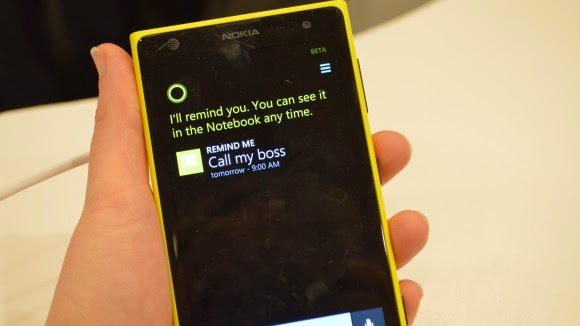
Reminders are easy to set up

When you have Cortana you won’t forget any information to fill in while keeping your reminder. With the demo use, a user noticed while setting up reminder.

User: “Remind me to pick up grocery tomorrow “
Cortana:”When do you want me to remind you to pick up grocery tomorrow “
User: “10:00AM”

And further also Cortana would ask about which place you have to pick up grocery, until all the necessary details are being filled up.


A guide within phone
Cortana also suggest you how to interact with her, it also takes you in the menu within the phone. If user want to go settings app for changing the theme, user can user Cortana and say “Start+theme” and your PA would take you there.

Action Center:

Action center is upgraded with much useful features; user can pull down two kind of views in the action center. The first section or the ¼ shows the pinned tiles in the top that included a button to go to settings, time and battery life, the date.


Minor Changes:
Camera is given minor changes and the lenses are available on the right side of camera screen, helps user to jumps into different options.  A new mode is added, burst mode that makes camera in line with hardware.  


A much improved calendar looks. User can personalised their personal pictures in the background. Windows 8.1 copying the IOS parallax effect set the image with the swipe up and down pf the start screen.


Verdict:

8.1 has most powerful update of PA: Cortana giving much ease to user and a tough competition to Siri.  The answer given by Cortana is more accurate and encourages user to use the feature more and more. Action center has also improved and apart from that the canvas mode makes the user ease to remember about the things searched in past.

The core update of 8.1 is Cortana and the rest updates are as usual which has to be as per the OS is updated.
We hope that Cortana gives a tough fight to Apple’s PA: Siri. Windows 8.1 a strong update of windows so far.


PRONS

CONS

Voice search of Cortana is superb
More efforts are needed to make Phone usage personal
Cortana helps to navigate over all: within the phone and external search also
Background feature is to catchy
Action center is tardy improvement  


Image Courtesy  : Techradar

Shout out on Social Media

Pageviews from the past week